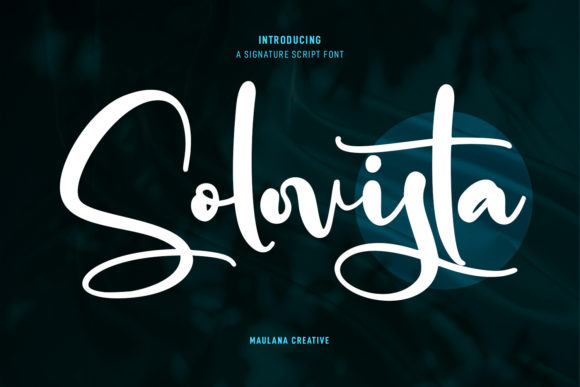
Solovista Signature Script: A Font That Feels Like You
You know that feeling when you find a typeface that just clicks? It’s not overly ornate, nor is it plain. It has personality, but it doesn’t scream for attention. That’s the sweet spot Solovista Signature Script occupies. This isn’t just another script font to hoard in your ever-growing library; it’s a tool designed to inject a specific kind of energy into your work—one that feels modern, approachable, and genuinely human.
Beyond the Basic Handwritten Look
Many script fonts fall into one of two camps: the overly formal, calligraphic style that feels stiff, or the casual, messy scrawl that can look unprofessional. Solovista charts a different course. It’s a modern script font characterized by its regular contrast strokes, meaning the difference between thick and thin lines is balanced and intentional. This creates a sense of rhythm and flow that feels both polished and personal. The “fun characters” aren’t gimmicks; they’re thoughtful alternates and ligatures that allow you to customize words, avoid awkward letter combinations, and give headlines or logos a truly custom feel. It’s this blend of control and creativity that makes it such a versatile design asset.
Where This Font Truly Shines
Let’s talk practical application. Where does a premium font like Solovista Signature Script actually earn its keep? The answer is almost anywhere you need to convey warmth, authenticity, or creative flair without sacrificing clarity.
For brand identity, particularly for solopreneurs, coaches, artists, or boutique brands, this font can become the cornerstone of your visual voice. Imagine it on a logo for a handmade skincare line, the header of a personal blog, or the name on a product label. It immediately sets a tone that’s more relatable than a stark sans-serif, yet more refined than a standard casual script. In packaging design, it can highlight a product’s artisanal quality or a special edition’s exclusivity.
Content creators and marketers, listen up. Your social media graphics are fighting for split-second attention. A font with the right personality can make a quote graphic, a sale announcement, or a story template stop the scroll. Solovista’s legibility at various sizes makes it a strong contender for Instagram posts, Pinterest pins, and even animated text in Reels or TikTok videos. For web design, it can be used strategically—think hero sections, pull quotes, or call-to-action buttons—to add a touch of elegance and guide the user’s eye. Pair it with a clean sans serif font for body text to maintain readability while injecting character into your site’s headers.
Don’t overlook print and physical products. It’s a fantastic choice for invitation design, whether for weddings, events, or even digital invitations for webinars and workshops. The alternates let you create something that feels bespoke. For editorial design in magazines or lookbooks, it can bring a dynamic, personal touch to headlines and feature titles. If you sell merchandise—think tote bags, mugs, or apparel—this creative font can turn a simple phrase into a desirable design.
Matching Typography to Your Project’s Goal
Choosing a font isn’t about finding the prettiest one; it’s about finding the right communicator. Ask yourself: what is the core message of this project? If you’re designing for a law firm, Solovista is probably not your primary typeface. But if you’re creating a brand for a freelance photographer, a wedding planner, a cozy cafe, or a digital course creator, its friendly yet professional vibe is a perfect match.
A crucial step is font pairing. A display font like a script rarely works well for long paragraphs. Its strength is in headlines, subheads, and call-outs. The real magic happens when you pair it with a complementary workhorse. Try it with a geometric sans serif font for a clean, contemporary look, or with a classic, low-contrast serif font for a touch of timeless elegance. Always test your pairings in context. Create a mock-up of your website header, a sample social media post, or a business card layout to see how the fonts interact at different sizes and in different environments.
Practical Tips for Using Solovista Signature Script
- Explore the Alternates: Don’t just type and go. In your design software, open the glyphs panel to see all the alternate characters and ligatures. Swapping a standard ‘a’ or ‘t’ for an alternate can completely change the word’s personality and solve spacing issues.
- Consider Readability: While it’s highly legible for a script, be mindful of context. For very small text (like a footer disclaimer), a simpler typeface is a better choice. Use Solovista where it can breathe—in sizes that allow its character to be appreciated.
- Review the License: As a commercial font, always check the licensing terms. Ensure it covers your intended use, whether for a client project, print-on-demand merchandise, or digital products for sale. Reputable font licenses protect both you and the designer.
- Think About Color and Background: Script fonts can sometimes lose definition on busy backgrounds or in low-contrast color pairings. Test it on both light and dark backgrounds to ensure it remains crisp and readable.
In the end, the fonts you choose are silent ambassadors for your brand or project. They set a mood before a single word is read. Solovista Signature Script offers a specific, valuable mood: one of modern craftsmanship, approachable creativity, and thoughtful design. It’s the kind of typeface that doesn’t just fill space but adds a layer of meaning, helping your work connect on a more personal level with your audience. It’s worth exploring to see if its voice aligns with yours.